Network Center
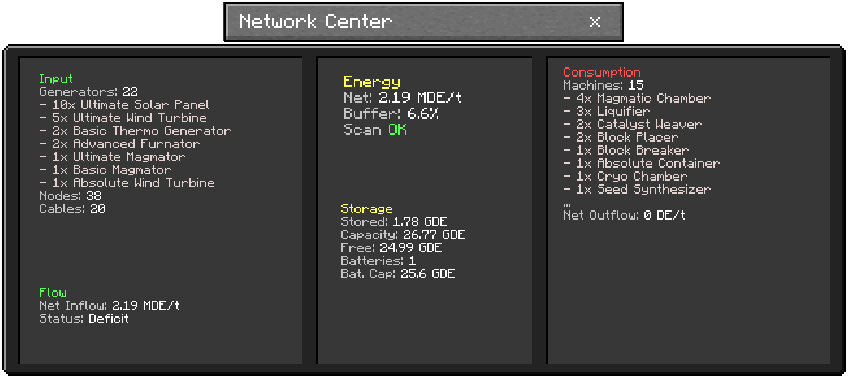
Control panel that scans the connected energy network and shows a full system summary.
[!NOTE] Not the final UI design; WILL change in future versions.
What it does
- Scans cables and energy-tagged blocks in the network.
- Counts machines, generators, batteries, cables, and nodes.
- Shows stored energy, capacity, balance, and overall status.
- Provides real-time monitoring of network health and performance.
How to use
- Connect the block to the energy network.
- Keep enough energy for continuous scanning.
- Read the panels shown in the block UI.
Machine Capabilities
- Energy Capacity: 800,000 DE (0.8 MDE)
- Energy Consumption: 400 DE per scan cycle
- Processing Rate: 8,000 DE/tick
- Scan Interval: Approximately every ~2 seconds
- Network Limit: 4096 nodes (with truncation warning beyond this limit)
- Upgrade Slots: None
What appears on the panels
- Consumption (machines) and generation (generators).
- Stored energy, capacity, and free space.
- Net flow per tick and status (Stable/Charging/Draining/Deficit/Buffer Full).
- Truncation warning when the network exceeds the safety limit (4096 nodes).
Network Monitoring
The Network Center provides comprehensive monitoring of:
- Machines: Active energy consumers in the network
- Generators: Active energy producers in the network
- Batteries: Energy storage devices
- Cables: Energy transmission infrastructure
- Total Nodes: Complete count of network-connected blocks
Performance Notes
- Constant energy consumption required to maintain monitoring.
- Scan cycles run automatically approximately every 2 seconds.
- Large networks (approaching 4096 nodes) may show performance warnings.