UtilityCraft Machine UI Core
UtilityCraft/RP/ui/ui_core.json is the shared JSON UI control library used by UtilityCraft machinery and compatible extensions. It defines the uc namespace and supplies screens, labels, slots, progress displays, resource bars, upgrade tabs, IO configuration, information tabs, toggles, and lower-level helpers.
ui_core.json into your addonUtilityCraft already loads this file from its Resource Pack. Your addon only creates and registers its own UI files, then references the shared elements with @uc.<element>. Duplicating the namespace creates version conflicts and prevents UtilityCraft from updating the shared UI safely.
Dependency contract: the UtilityCraft Resource Pack must be active below or alongside the extension according to the world pack stack. The extension does not bundle another copy of UI Core or its textures.
What the shared controls look like
This is a production UtilityCraft Assembler screen. The title, gray machine screen, energy bar, slot outlines, upgrades, IO tab, and information tab are composed from uc controls.
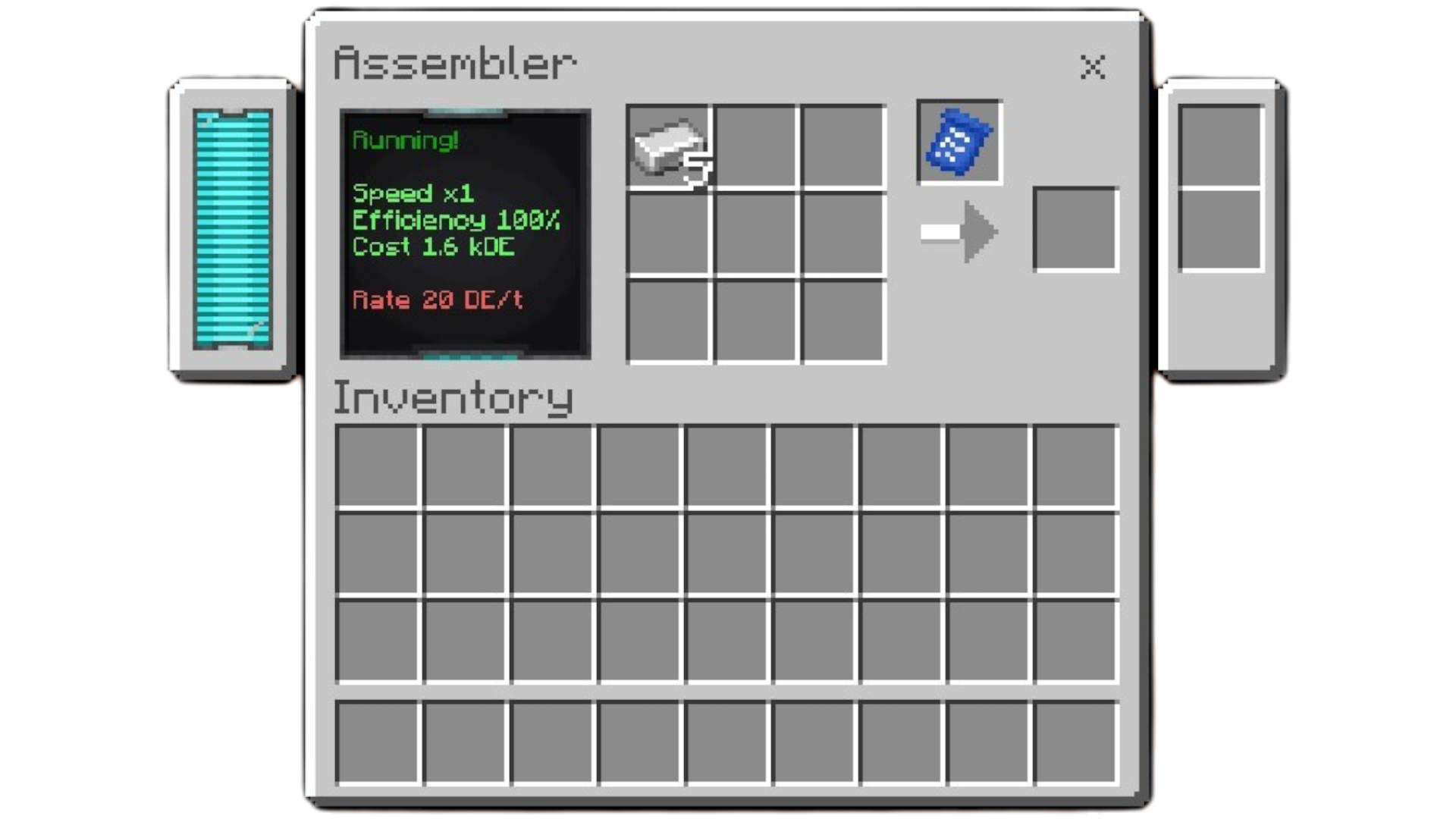
The texture previews throughout this section are copied into the documentation site only from UtilityCraft's real RP assets. They show the actual pixels used in-game; they are not files an addon should duplicate.
Register only your UI file
Your Resource Pack lists its own file:
{
  "ui_defs": [
    "ui/example_machinery.json"
  ]
}
Then the addon-owned UI uses a different namespace and references UtilityCraft controls:
{
  "namespace": "example_ui",

  "crusher_top": {
    "type": "collection_panel",
    "anchor_from": "center",
    "anchor_to": "center",
    "size": [162, 72],
    "offset": [-10, -40],
    "collection_name": "container_items",
    "$item_collection_name": "container_items",
    "controls": [
      { "machine_name@uc.machine_name": {} },
      { "screen@uc.machine_small_screen": {} },
      {
        "description@uc.text_label": {
          "collection_index": 1,
          "offset": [14, 12],
          "size": [48, 48],
          "$text_scale": 0.55
        }
      },
      {
        "energy@uc.energy_bar": {
          "offset": [-101, -13]
        }
      },
      {
        "input@uc.input_slot": {
          "collection_index": 3,
          "offset": [0, 30]
        }
      },
      {
        "progress@uc.progress_display": {
          "collection_index": 2,
          "offset": [28, 23]
        }
      },
      {
        "output@uc.output_slot": {
          "collection_index": 4,
          "offset": [56, 26]
        }
      },
      { "upgrades@uc.upgrades_tab": {} },
      { "io@uc.io_tab": {} },
      {
        "info@uc.info_tab": {
          "$info_description": "ui.example:info.crusher"
        }
      }
    ]
  }
}
The complete UtilityCraft Addon Template includes the chest-screen routing, labels, entities, and container indices required for a working machine.
Element syntax
{
  "local_control_name@uc.shared_element": {
    "collection_index": 4,
    "offset": [20, 24],
    "$custom_variable": "value"
  }
}
| Part | Meaning |
|---|---|
local_control_name | Name unique inside the current controls array. It does not need to match the shared name. |
@uc.shared_element | Inherits the named control from UtilityCraft's uc namespace. |
$custom_variable | Parameter intentionally exposed by that shared element. |
collection_index | Index in the helper entity's container_items collection. It is a standard JSON UI property, not a UI Core $ variable. |
anchor_from, anchor_to, offset, size, layer, visible | Standard JSON UI overrides accepted where appropriate by the inherited control. |
The reference tables list custom $variables. Standard JSON UI properties are not repeated in every row.
Collection-index contract
UI Core does not decide which machine value belongs in an inventory slot. The machine helper entity, labels, button items, progress frames, resource display items, and IO buttons must be written to the same indices referenced by the JSON UI.
For example:
| Index | Typical content | Control |
|---|---|---|
1 | Machine information label | uc.text_label |
2 | Progress frame item | uc.progress_display |
3 | Input item | uc.input_slot |
4 | Output item | uc.output_slot |
5–8 | Upgrade items | uc.upgrades_tab variables |
9+ | IO face button items | uc.io_tab direction-index variables |
The actual indices are machine-owned. Override every relevant variable when your entity layout differs from a control's defaults.
Reference categories
| Category | Contents |
|---|---|
| Visibility, labels, tooltips, and buttons | Conditional panels, hover text, machine title, dynamic labels, slot hover behavior, and buttons. |
| Items and slots | Item renderers, progress displays, input/output/fuel/upgrade slots, and the numbered IO outline families. |
| Bars, grids, and screens | Energy/liquid bars, multi-bars, slot layouts, machine screens, and side panels. |
| Tabs and IO configuration | Generic toggles, upgrade tab, IO face controls, IO tab, and information tab. |
| Complete element index | All 100 top-level definitions, inheritance relationships, and public status. |
Public versus implementation controls
Names beginning with _, such as uc._slot_visual, are implementation primitives used to build stable public controls. They remain listed because they exist in ui_core.json, but normal extension UIs should prefer their public wrappers. Controls inheriting @common.* or other uc elements are templates, not separate files that must be registered.